
The remote proctoring market has grown exponentially in recent years and is expected to reach $1.19 billion by 2027. This popularity comes with the convenience of LMS integration, scalable solutions, and exam security. With this growth, it is crucial to learn the difference between the many types of remote proctoring services offered in the industry to find one that best suits your institution’s needs.
Lockdown Browser
Some of the common types of online proctoring services include the lockdown browser. Lockdown browsers lock a computer into an assessment window during the entirety of an exam session. When students are taking an exam with a lockdown browser, they cannot access other applications or print. Many keys and toolbar options are also disabled or prohibited until after an exam is complete, including right-click menus, copy and paste, new tabs, or minimizing the browser.
Lockdown browsers are very convenient because students only need to download an extension or browser to use it. However, because of the lack of security that a proctor provides, they often do not allow students back in if they accidentally or intentionally leave the exam. These browsers usually do not require students to provide ID, making it less secure.
Furthermore, they are often easy to bypass as well. Many websites online provide tips on how to cheat despite using a lockdown browser, defeating the purpose of a lockdown browser, while providing a false sense of security for school administrators. Some ways of cheating include continuously holding down the Alt and Tab keys to skim through other open applications. Students could also download a virtual machine or desktop and search through applications through that or by creating a new user if they have a Mac. Simply using another device including a cell phone, tablet, or other computer and by placing it below the screen of the device that you are taking the test on will also suffice.
Automated Proctoring
Automated proctoring is another option for remote proctoring that utilizes AI rather than live proctors. Facial recognition software is used to verify test takers’ identities, record the duration of exam sessions, and use detection technology to flag any incidents deemed inappropriate for review by school administrative representatives after the exam. Some students have expressed feeling watched by live proctors so automated proctoring is another option as it does not include any human proctors. However, if anything happens during the exam session, students may not have the opportunity to speak to a live proctor who would be able to assist them.
A popular option because it is more scalable, automated proctoring has also been shown to be detrimental to some students who are accidentally flagged. Although the model is built on the convenience of reports that list flagged incidents during a session with the intention of having administrators review them before punishing students, studies have also shown that that is not the case. A study conducted by ProctorU using internal data showed that only about 10% of faculty members actually reviewed these videos which may lead to students being unfairly punished.
AI Proctoring with Intervention
By providing some live proctors, AI proctoring with intervention gives students the opportunity to talk to a live proctor if needed who can examine recordings of incidents flagged by AI to ensure no cheating happened during an exam session or to report it if it did. Since this method does require using human proctors, it is less scalable than just AI proctoring.
Webcam Live
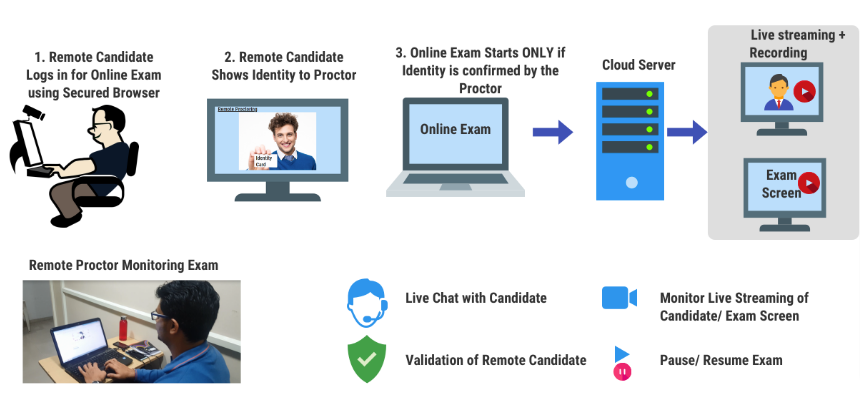
Webcam live proctoring consists of human supervision and monitoring throughout the exam session. Test takers first verify their identity with live proctors and are usually able to reach out during the exam for technical assistance using the live chat feature. Webcam live proctoring seems to be a safe option but because proctors have only a limited view of a test taker’s surroundings because there is only a single camera, students can still cheat with things like external projectors or another device. Furthermore, it cannot always be scalable because it requires live proctors.
360 Total View
To combat the blindspots of webcam live proctoring, companies like Proctor360 have developed a system that utilizes a 360° camera, in addition to offering other services like webcam live proctoring,auto proctoring, and an institutional SaaS solution that employs an organization’s own staff.
Proctor360 either sends the 360 device to the student or the student picks one up from their organization for exams proctored through their 360 Total View service. Then, test takers can take their exam with a proctor monitoring them, their screen, and their environment at all times. Things such as writing on walls and people coming in where out of view are visible throughout the exam. The system can also be used for paper exams. Ultimately, this gives confidence to the test organization that their exam is being taken remotely with the most secure solution available.